How To Connect Etsy Listings To Instagram Shopping Without Manual Uploads
If you are tired of exporting CSVs and re-uploading product files every time you add a new listing, there is a faster, fully automated way. In this guide, you will learn how to connect your Etsy listings to Instagram Shopping without manual uploads using a reliable product feed URL. The secret is to use a lightweight tool that generates a live catalog feed for your shop and keeps everything in sync daily.
Quick answer: Use Catalog Generator for Etsy to produce a product feed URL, add it as a data source in your Commerce Manager, verify your shop domain, and start tagging products in posts and stories. No spreadsheets, no manual imports, no busywork.
Try Catalog Generator free for 7 days — only $5 per month after the trial.

Why connect Etsy to Instagram Shopping via a feed
- Automate product sync and updates across your catalog (titles, prices, images, availability)
- Tag products in posts, reels, and stories to drive traffic directly to your listings
- Show products in your Instagram and Facebook Shops without manual maintenance
- Scale easily as your shop grows
What you need before you start
- A Facebook Business account at business.facebook.com
- Your Facebook Page and Instagram account linked to your Business account
- Your Instagram account switched to a business or professional account
- Access to your Etsy Shop Manager
- A live catalog feed URL (you will generate this with Catalog Generator)
Step-by-step: Connect Etsy listings to Instagram Shopping without manual uploads
1) Verify your Etsy shop domain in Business settings
- Go to business.facebook.com and open Business settings
- Navigate to Brand Safety and Suitability, then Domains
- Click Add and enter your Etsy shop domain. Use your shop’s slug from its URL and append .etsy.com. For example, your-shop-name.etsy.com
- Copy the HTML meta tag provided
- In Etsy Shop Manager, go to Settings, then Facebook Shops
- Paste the meta tag and connect
- Return to Business settings and click Verify
2) Generate your live product feed URL with Catalog Generator
- Visit the app: catalog-generator.webyze.com
- Create an account or log in, then connect your Etsy shop
- The app generates a catalog feed URL for your listings. Copy that URL
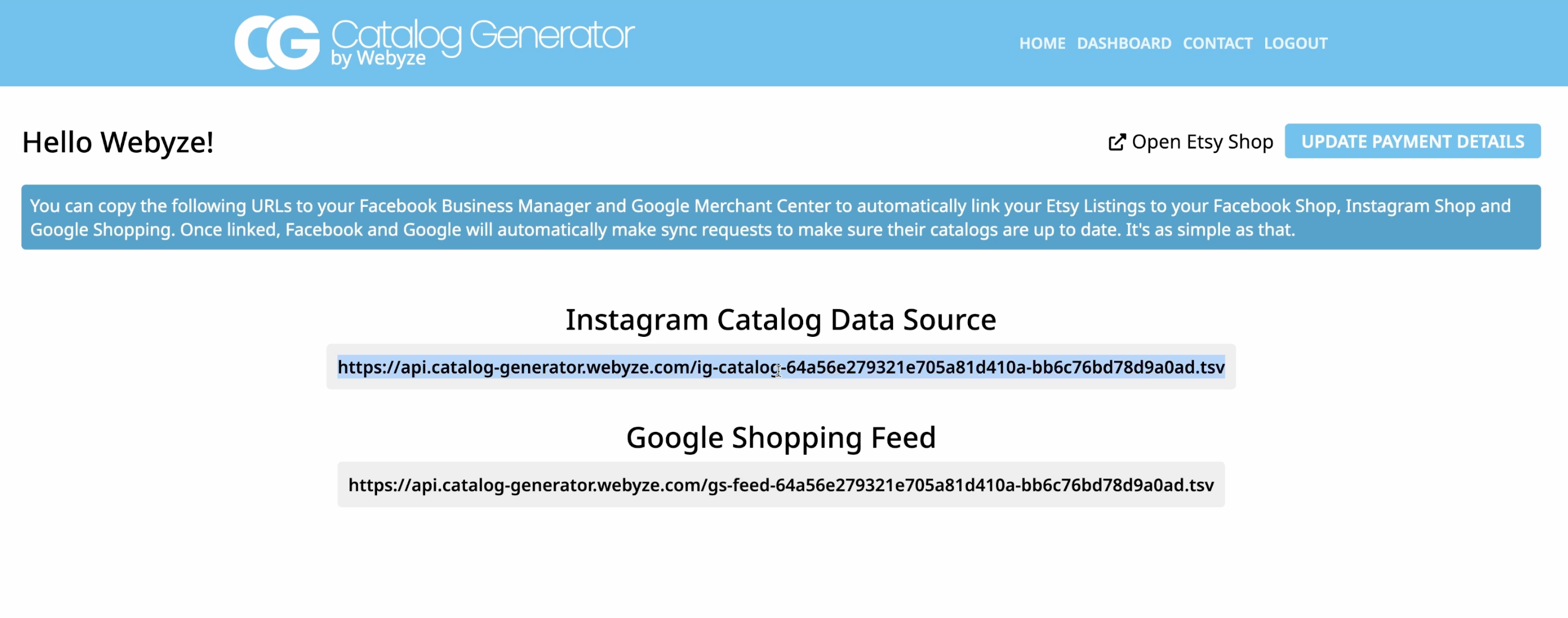
3) Add the data feed URL in Commerce Manager
- From business.facebook.com, open Commerce Manager
- If you do not have a catalog yet, create one, then open it
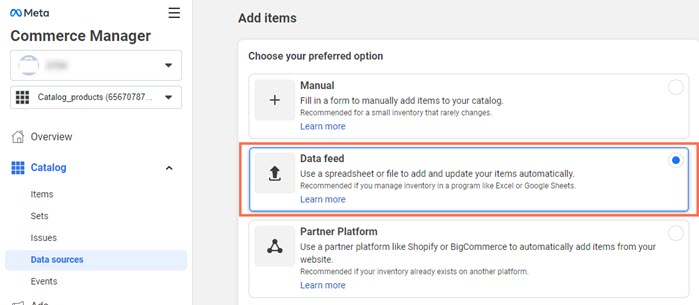
- Go to Catalog, then Data sources, and click Add items
- Choose Data feed
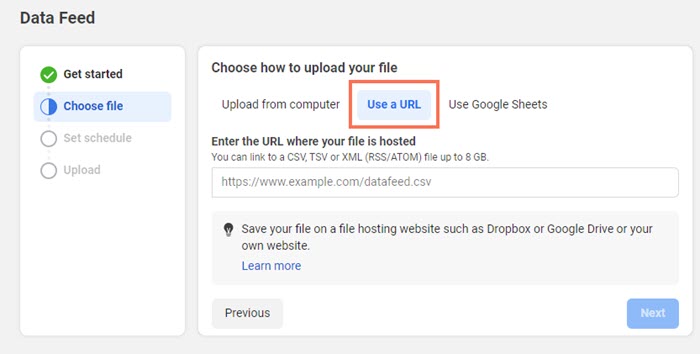
- Select Use a URL so your products always stay synced
- Paste the Catalog Generator URL
- Set an automatic schedule (daily is perfect) and save
Commerce Manager will fetch all your Etsy listings and populate your catalog. This can take several minutes depending on your inventory size.
4) Submit your shop domain for approval
- In Commerce Manager, open Settings, then Catalog
- Under Not submitted, submit your verified domain
- Once approved, you can tag products that redirect shoppers to your Etsy listing pages
5) Start tagging products in posts, reels, and stories
- Create a post or story and tap Tag products
- Search your synced items, tag them, and publish
- Shoppers can tap the tag and land on your Etsy product page to purchase
Video tutorial Watch the full walkthrough: Link your Etsy listings with your Instagram Account and Facebook Page — Catalog Generator for Etsy https://www.youtube.com/watch?v=2ChLE92Cu4s
Why use Catalog Generator for Etsy
- True set-and-forget syncing via a live URL
- No spreadsheets or manual uploads
- Clear instructions inside the app, plus friendly support if you need help
- Affordable: only $5 per month after a 7-day free trial
Get started now: Catalog Generator for Etsy
Pro tips to boost reach and conversions
- Optimize product titles and descriptions with clear keywords and materials
- Use bright, high-resolution photos with clean backgrounds and consistent framing
- Keep inventory accurate; mark sold-out items properly to avoid disapproval
- Refresh your catalog daily and post consistently to train the algorithm
- Tag multiple relevant products in a post to showcase collections
- Leverage stories and reels for timeliness and behind-the-scenes content
Troubleshooting common snags
- Domain verification fails: ensure you pasted the exact meta tag in Etsy Shop Manager under Settings, Facebook Shops. Then click Verify in Business settings
- Items not appearing: give the initial import time to complete. Check the latest fetch status in Data sources
- Price or title not updated: confirm the daily schedule ran, or trigger a manual fetch in Commerce Manager
- Product disapprovals: review image quality, missing GTINs if required for certain categories, and ensure availability status is accurate
Pricing and free trial
- Catalog Generator costs $5 per month, billed monthly
- Includes a 7-day free trial to test the workflow end to end
- Cancel anytime if it is not the right fit
Start your free trial: catalog-generator.webyze.com
FAQ
- Do I need to manually upload files? No. Using the feed URL from Catalog Generator keeps everything in sync automatically
- What happens when I add a new Etsy listing? It is added to your feed and appears in your catalog on the next scheduled fetch
- Can I tag products in reels and stories? Yes. Once your domain is approved and your catalog is connected, you can tag products across posts, reels, and stories
- How long does approval take? Domain approval timelines vary. Submit early and ensure your domain is correctly verified to speed it up
- Is this suitable for small shops? Absolutely. It is built for solo sellers and scales smoothly for larger catalogs
Your next step In less than an hour, you can connect your Etsy listings to Instagram Shopping, automate your catalog updates, and start tagging products without ever touching a CSV again.
Launch now with the 7-day free trial: Catalog Generator for Etsy.

Comments
Post a Comment