Framer Exporter Guide To Download And Self Host Your Framer Site
If you love designing in Framer but want to self-host for cost control, performance, or workflow flexibility, this Framer Exporter guide is for you. Below, you’ll learn exactly how to download your Framer site, convert Framer to HTML, and deploy it anywhere using ExFlow — a fast, reliable Framer downloader and exporter.
Why self-host a Framer site?
- Lower costs: If Framer hosting feels too expensive for your use case, self-hosting is a cost-effective alternative.
- Full control: Bring your own CDN, CI/CD, performance rules, and security policies.
- Portability: Keep a local copy of your Framer to HTML export and move hosts freely.
- Integrations: Connect to Git, S3, FTP, or traditional servers without lock-in.
What you’ll use in this guide
- ExFlow — a Framer Exporter and Downloader that lets you export all pages, CSS, JS, and images as static files. Visit ExFlow: https://exflow.site
- A hosting destination — options include ExFlow Hosting, Amazon S3 + CloudFront, GitHub Pages/Netlify, or any FTP-based server.
Quick glossary for SEO and clarity
- Framer Exporter / Framer Downloader: Tools to download a Framer site as static files.
- Download Framer Site: Getting all HTML/CSS/JS/Images locally.
- Framer to HTML: Converting a Framer site into portable static code.
- Self-host Framer site: Hosting your Framer export on your own infrastructure.
How to download your Framer site with ExFlow (step-by-step) 1) Go to ExFlow
- Open https://exflow.site
- Click to start a new export.
2) Enter your site URL
- Paste the live URL of your Framer site. ExFlow crawls and packages your pages.
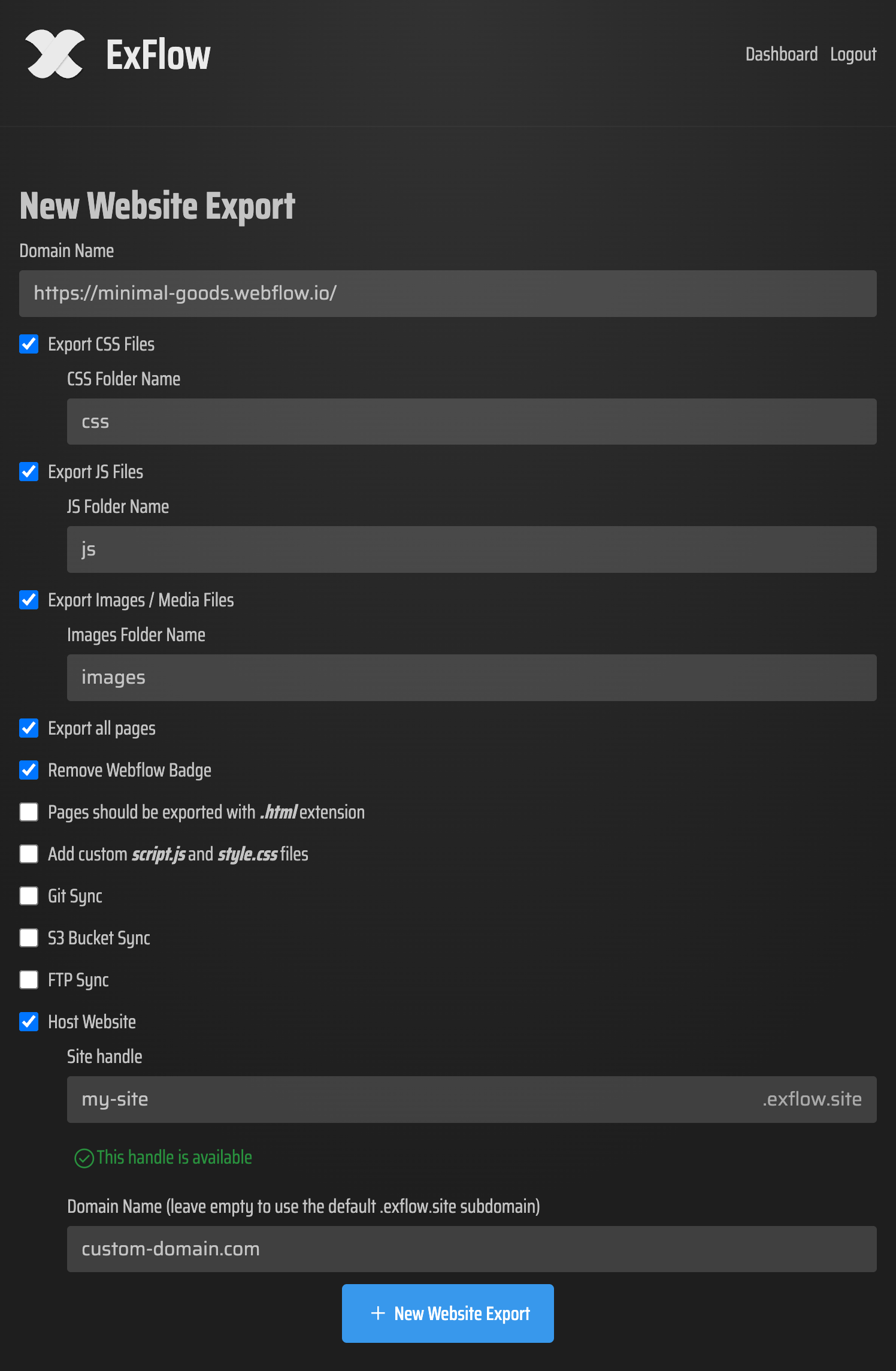
3) Choose export options
- Export CSS Files, JS Files, and Images/Media
- Export All Pages (essential for full coverage, including linked pages)
- Remove “Made with” badge if desired
- Add custom script.js and style.css files for post-export tweaks
- Set pages to export as .html
4) Optional: One-click syncs and hosting
- Sync Git, S3, or FTP by securely entering your credentials (only if you want automatic deployment)
- Pick ExFlow Hosting for the easiest setup, with unlimited bandwidth and custom domain support
5) Export and download
- Click Export and download your zip bundle
- Unzip to inspect your Framer to HTML output locally
Pro tips during export
- Export All Pages catches deeper routes and prevents 404 surprises.
- Keep CSS/JS as external files for cacheability and performance.
- Use the custom script/style options to inject analytics, feature flags, or post-export fixes.
Where to host your exported Framer site Option A — Host directly on ExFlow (fastest)
- Choose Hosting inside ExFlow during export.
- Map your custom domain and go live with unlimited bandwidth and built-in static optimization.
- Great if you want zero DevOps and immediate publishing.
Option B — Amazon S3 + CloudFront (scalable and affordable)
- Create an S3 bucket, enable static website hosting, and set index.html as default.
- Use ExFlow’s S3 Sync to push your export automatically.
- Add CloudFront for global CDN and HTTPS.
Option C — Git + GitHub Pages/Netlify (CI/CD friendly)
- Use ExFlow’s Git Sync to push your files to a repository.
- Deploy via GitHub Pages or Netlify for automated builds and previews.
- Perfect for teams and versioned workflows.
Option D — FTP to any server (traditional hosting)
- Provide your FTP credentials in ExFlow and sync on export.
- Confirm your webroot, index.html, and MIME types are configured properly.
Essential post-export checklist (SEO + performance)
- Metadata and Open Graph: Verify titles, descriptions, and social share images render correctly.
- Canonicals: Add rel="canonical" to prevent duplicate content across mirrors.
- Sitemap + robots.txt: Generate a sitemap.xml and a clear robots.txt policy.
- Redirects: Handle 301/302 rules for cleaned URLs or changed slugs.
- Image optimization: Serve modern formats where possible and set caching headers.
- Accessibility: Keep alt text, heading hierarchy, and focus states intact.
- Analytics: Inject your tracking script via ExFlow’s custom script.js if needed.
- Forms and search: Static exports may need a serverless form endpoint (e.g., a webhook) and a JS-based site search.
Is ExFlow a Framer alternative?
- Design in Framer, host anywhere: ExFlow doesn’t replace the design power of Framer. Instead, it helps you download your Framer site and deploy it as portable static HTML/CSS/JS.
- Cost control when Framer is too expensive: If your site is mostly static and budget-sensitive, exporting with ExFlow and self-hosting can significantly reduce recurring costs.
Why ExFlow for Framer to HTML exports
- One URL, full export: Enter your site URL and capture pages, CSS, JS, and images.
- Export All Pages: Avoid missed routes and orphaned content.
- Badge removal: Clean professional look by removing “Made with” badges.
- Add custom files: Seamlessly include script.js and style.css.
- Automatic sync: Git, S3, and FTP integration for instant deployment.
- Built-in hosting: Publish in minutes on ExFlow with unlimited bandwidth and custom domains.
- Flexible plans: Choose the plan that matches your site count, export size, and sync needs.
Security and compliance notes
- Credentials: When using Git/S3/FTP sync, you’ll provide sensitive credentials. Store them securely, rotate periodically, and restrict permissions to what’s required.
- Terms of service: Only export and host content you own or have rights to. Always respect Framer’s and your hosting provider’s terms.
Quick FAQs
- Can I download my Framer site as a zip? Yes — with ExFlow you can download your full site bundle as HTML/CSS/JS/Images.
- Does ExFlow handle all pages? Yes — enable Export All Pages to crawl and package your entire site.
- Can I self-host with my own domain? Yes — via ExFlow Hosting or any provider (S3, GitHub Pages, Netlify, FTP-based hosts). You can link a custom domain.
- What about CMS or dynamic features? Static exports capture rendered pages. Interactive or server-side features may require client-side or serverless alternatives.
- Will my animations work? ExFlow preserves CSS/JS assets, so typical animation libraries and Framer-generated effects continue to function.
Action plan: Download and self-host your Framer site today 1) Visit ExFlow: https://exflow.site 2) Paste your Framer URL, select Export All Pages, and include CSS/JS/Images. 3) Remove the badge, add custom script/style files, and pick your sync/hosting preference. 4) Export, download, and deploy — or host directly on ExFlow.
Ready to take control of your site’s costs, speed, and portability? Download your Framer site with ExFlow now: https://exflow.site

Comments
Post a Comment