How to Export an Entire Webflow Site Including CMS Content and Assets
Understanding the Export Process with Webflow
Webflow has become a powerhouse in the realm of website design, offering a host of tools that enable designers to build visually stunning, fully responsive websites. However, one limitation many designers face is the inability to export CMS content along with the rest of the website assets. Fortunately, there's a solution! ExFlow provides a seamless way to export your entire Webflow site, including the coveted CMS content.
Why Choose ExFlow for Your Webflow Exports?
Harnessing the power of ExFlow.site can open new avenues for those who wish to move beyond the default constraints of Webflow’s export features:
- Complete Site Export: With ExFlow, you’re not just limited to static pages. You can export your entire Webflow site, including dynamic CMS pages, stylesheets, images, and scripts.
- Cost-Effective: ExFlow is a cost-efficient tool, especially beneficial for designers who want full control over their sites without breaking the bank.
- Customizable Exports: You can fine-tune what you want to export, allowing for more tailored solutions based on the project requirements.
Step-by-Step Guide to Exporting with ExFlow
Here’s how you can leverage ExFlow to export your entire Webflow site seamlessly:
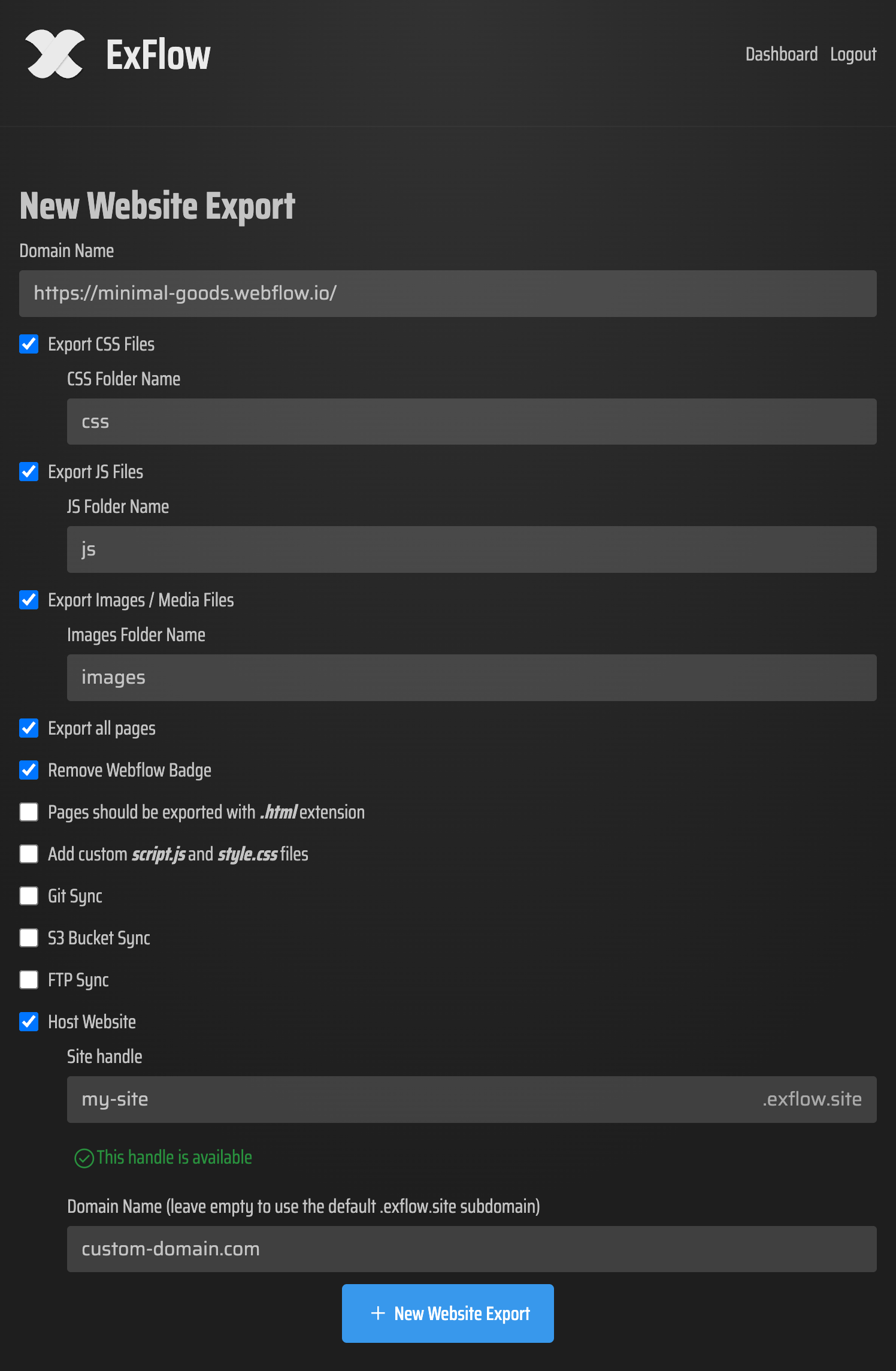
Start at ExFlow: Navigate to ExFlow.site and initiate the process by entering the URL of your Webflow site.
Configure Your Export Settings: You’ll be prompted to choose your export options. Select CSS files, JS files, images, and importantly, the CMS pages. Moreover, ExFlow allows you to remove the Webflow badge and add custom scripts or style sheets.
Manage Automatic Syncing: If desired, configure automatic syncing options to platforms like S3, Git, or FTP. This can be especially useful if you plan to host your site on a different service.
Export: Start the export process, which gathers all your selected files and content.
Download or Sync: Once ExFlow has completed its task, you can either download a ZIP file containing your entire site's files or use the syncing feature to upload it directly to your preferred hosting service.
Hosting Your Exported Webflow Site
After exporting your site, there are myriad ways to host your content. Here are some popular options:
AWS S3: Cost-effective and scalable, hosting static sites on Amazon S3 is straightforward. You simply upload your files, configure the bucket settings for static website hosting, and you're live!
GitHub Pages/Netlify: For developers with existing Git repositories, ExFlow's Git sync feature simplifies deployment on platforms like GitHub Pages.
Traditional Servers via FTP: If you have access to a web server, configure your FTP settings in ExFlow, and let it automate the file upload process.
Reaping the Benefits of Independent Hosting
Embracing independent hosting solutions not only curtails costs but it also offers more flexibility and control over the hosting environment:
- Enhanced Control: Choose your hosting configurations, integrate with other platforms, and manage your files easily.
- Cost Savings: Although tools like Webflow provide bundled hosting, independent solutions often prove more economical in the long run.
Conclusion
Exporting a full Webflow site ought to be straightforward and comprehensive. Thanks to ExFlow, you can now achieve this feat with ease, gaining complete access to your site's content, including those elusive CMS pages. Whether you're a freelancer, a studio, or a client, ExFlow’s service can cater to your needs, empowering you to take full control over your digital creations.
Get started today with ExFlow and redefine how you export and host your Webflow sites!

Comments
Post a Comment