How to Export a Squarespace Site to Static HTML Without Losing Content
Squarespace is a popular platform for creating stunning, functional websites. However, if you're looking to host your Squarespace site independently, exporting it to static HTML might not be straightforward. In this article, we'll explore how to successfully export your Squarespace site to static HTML without losing any content, using ExFlow.
Why Export Your Squarespace Site to Static HTML?
Exporting your Squarespace site to static HTML comes with several advantages:
- Cost Savings: By hosting your site outside Squarespace, you can choose more affordable hosting providers.
- Greater Control: Gain complete control over the hosting environment and content customization.
- Performance Boost: Static HTML sites often load faster and are more secure, as they don't rely on server-side processing.
- Backup: Keep a complete backup of your website's content, giving you peace of mind.
How to Export Your Squarespace Site with ExFlow
ExFlow is a fantastic tool for exporting Squarespace sites easily to static HTML, CSS, and JavaScript. Here's how you can do it:

Step 1: Visit ExFlow.site
Navigate to ExFlow.site to begin.
Step 2: Enter Your Site URL
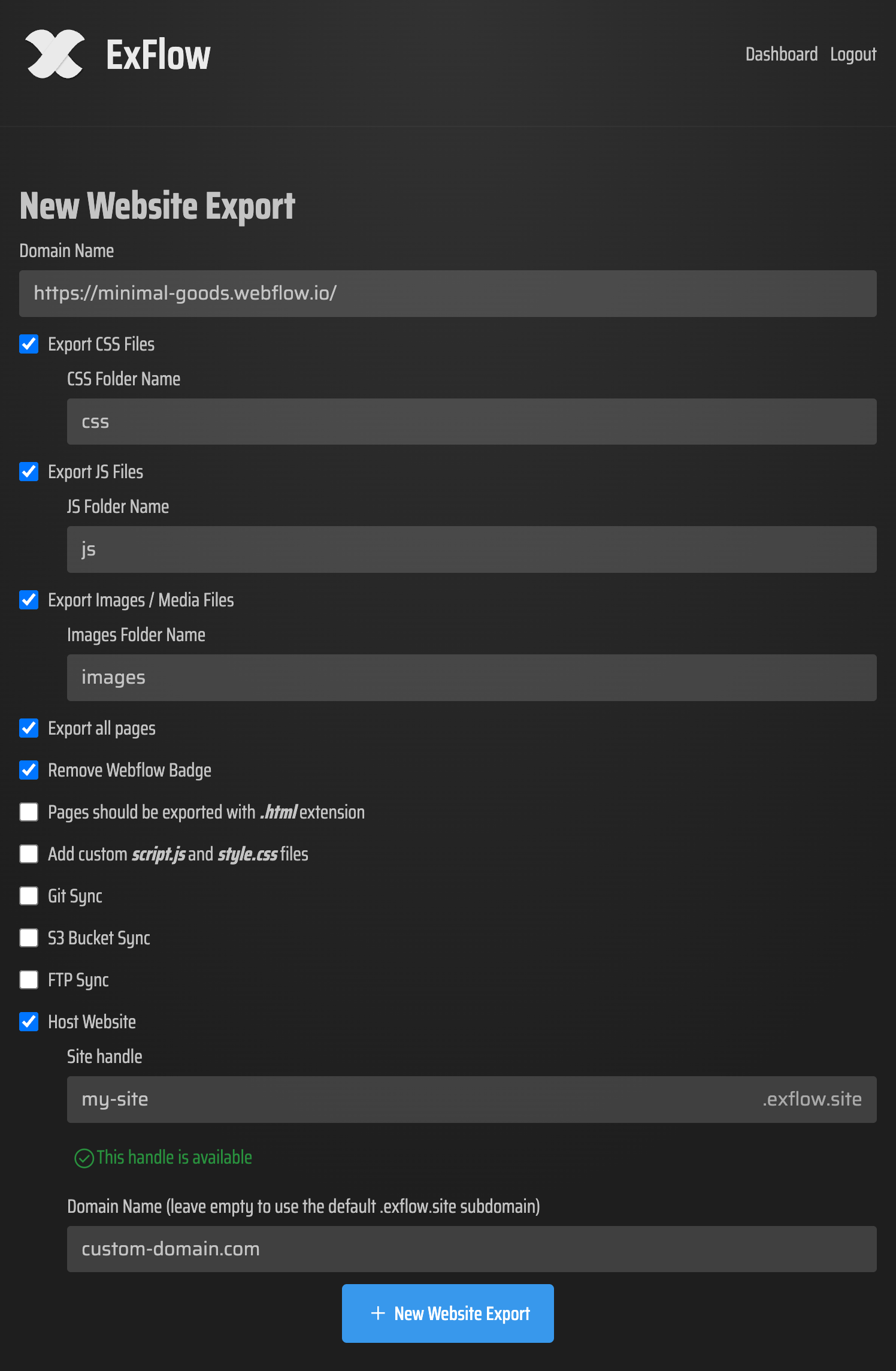
Input your Squarespace site's URL in the specified field. ExFlow processes this URL to gather all necessary data.
Step 3: Customize Export Settings
Choose what you want to export:
- CSS Files
- JS Files
- Images/Media Files
- All Pages
You can also opt to create custom scripts or style sheets and configure automatic syncing with platforms like Git, AWS S3, or FTP.
Step 4: Export All Pages
Ensure you select to export all the pages on your website. ExFlow will take care of transforming your dynamic content into static versions.
Step 5: Download or Sync
Once the export is complete, download the zip file containing all your site's files, or automatically sync with your chosen platform.
Hosting Options for Your Exported Site
After exporting your Squarespace site, you have a few hosting options:
Hosting with ExFlow
For simpler deployment, take advantage of ExFlow's hosting solutions. This option includes features like unlimited bandwidth and custom domain linkage for a polished appearance.
Hosting via AWS S3
AWS S3 is another great option for hosting static sites economically:
- Create an S3 bucket in your AWS account.
- Use ExFlow's S3 sync feature to automatically upload your files.
- Enable static website hosting and set index.html as your default.
Hosting through Git
For those integrating version control, host using Git:
- Connect your Git credentials with ExFlow.
- Allow ExFlow to sync files to your repository.
- Deploy using platforms like GitHub Pages or Netlify.
Hosting with FTP
For traditional servers:
- Enter your FTP credentials at ExFlow's setup.
- Automatically upload files to your server via ExFlow.
Conclusion
Exporting your Squarespace site to static HTML without losing content is not only possible, but it’s a smart way to enhance performance, control, and cost. ExFlow makes this process straightforward, empowering you to retain content fidelity while moving beyond the Squarespace ecosystem.
For those ready to take control of their Squarespace sites, visit ExFlow.site today and experience a seamless transition to static HTML hosting.
More resources:

Comments
Post a Comment