How To Sync Etsy Listings With Instagram Shopping Using A Data Feed
If you sell on Etsy and want to tag products in Instagram posts, reels, and stories, the most reliable way is to use a data feed. In this guide, you’ll learn how to sync Etsy listings with Instagram Shopping through Commerce Manager using a URL feed—so your catalog updates automatically every time you add or edit a listing.
Pro tip: The fastest path is to use Catalog Generator for Etsy, an affordable tool that creates a live feed of your listings you can plug straight into Instagram and Facebook. Start your free trial here: https://catalog-generator.webyze.com/

Why a data feed is the best way to tag Etsy products on Instagram
- Always in sync: When you update titles, prices, photos, or create new items, the catalog refreshes on a schedule (e.g., daily) without manual CSV uploads.
- Faster product tagging: Your items appear in Instagram Shopping and Facebook Shops, ready to tag in posts and stories.
- Cross-channel ready: The same feed can also help power Google Shopping or other social catalogs with minimal extra work.
Looking for a simple feed solution? Catalog Generator for Etsy provides a URL you paste into Commerce Manager and forget about it. It’s just $5/month after a 7‑day free trial, and you can cancel anytime: https://catalog-generator.webyze.com/
What you’ll need (checklist)
- A Facebook Business account: https://business.facebook.com/
- Your Instagram account switched to a Business or Creator account and linked to your Facebook Page
- An Etsy shop with active listings
- Domain verification in Business Settings (using your shop’s domain)
- A product data feed URL (we’ll generate this with Catalog Generator for Etsy)
Step-by-step: Sync Etsy listings with Instagram Shopping using a data feed
1) Create or access your Business account
- Go to https://business.facebook.com/ and create an account if you don’t have one.
- Ensure your Facebook Page and Instagram account are connected to this Business account.
- On Instagram, switch to a Business/Creator account (free) for access to Shopping features.
2) Verify your shop domain
- In Business Settings, go to Brand Safety and Suitability > Domains.
- Click Add and enter your Etsy shop domain in the format: yourshopname.etsy.com. You can confirm by visiting it in a browser.
- Choose the Meta tag verification method and copy the tag.
- In Etsy Shop Manager, go to Settings > Facebook Shops, paste the tag into the field provided, and connect.
- Back in Business Settings, click Verify. Your domain should now show as verified.
3) Generate your Etsy catalog feed URL
- Visit Catalog Generator for Etsy: https://catalog-generator.webyze.com/
- Create an account or log in and connect your Etsy shop to grant access to your listings.
- Copy the feed URL provided by the app. This is the URL you’ll paste into Commerce Manager.
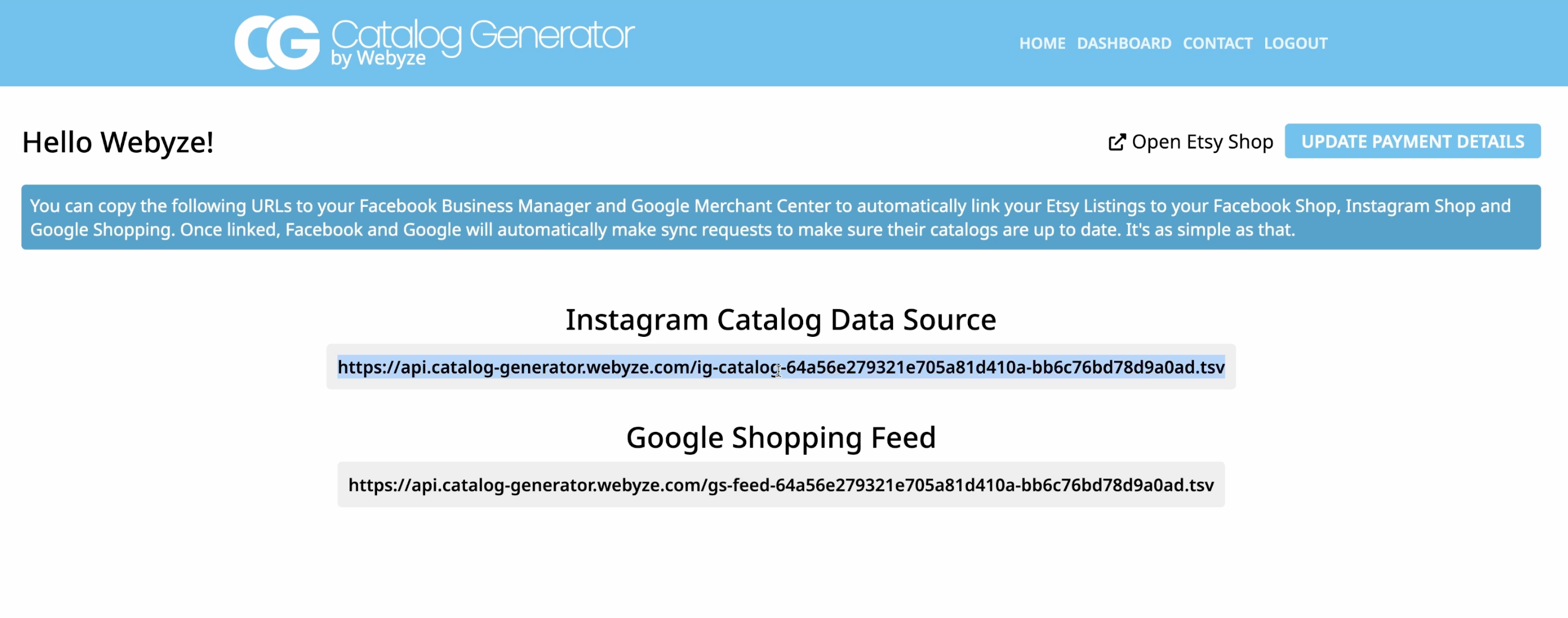
Why this tool? It automatically structures your Etsy listings into a compliant catalog feed and keeps it updated on schedule. No spreadsheets, no manual uploads. It’s $5/month with a 7-day free trial.
4) Create your catalog in Commerce Manager
- In Business Manager, open Commerce Manager and either create a new catalog or select an existing one dedicated to your Etsy products.
- Go to Catalog > Data Sources > Add Items and choose Data Feed to import all listings at once.
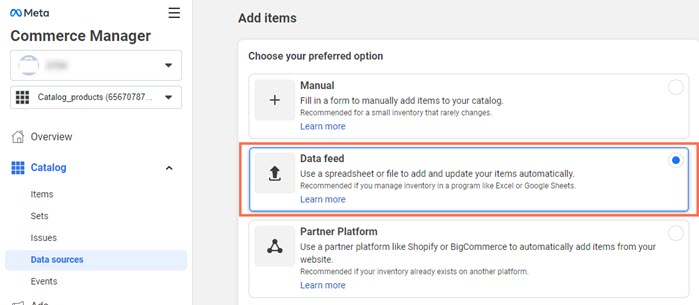
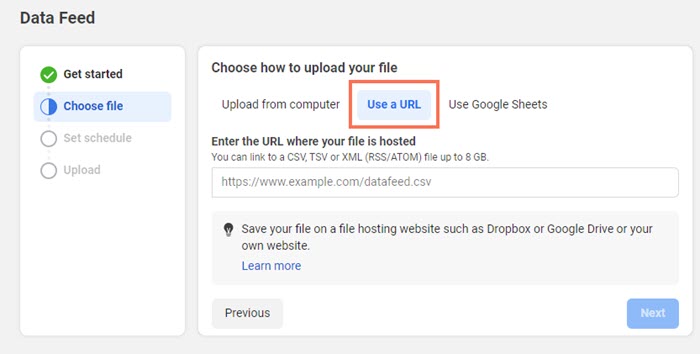
- Choose Use a URL so your catalog stays in sync automatically. Paste the feed URL from Catalog Generator.
- Leave optional credentials empty unless you specifically secured your feed.
- Set a fetch schedule (daily works well) and click Save Feed & Upload.
- Wait for the import to complete. Depending on listing count, this can take several minutes. You’ll then see items populate in the catalog.
5) Submit your domain for approval
- In Commerce Manager, go to Settings > Catalog. Under Not Submitted or similar, submit your verified domain for approval.
- Once approved, you’ll be able to enable Shopping on Instagram and tag products directly in posts, reels, and stories. Customers will be redirected to your Etsy listing to purchase.
Optimization tips for higher conversions
- Clean titles and strong first images: Your product’s main image and first 60–80 characters of the title carry the most weight in grid views.
- Keep inventory accurate on Etsy: The feed reflects what’s in your shop. Keep stock, variations, and pricing updated.
- Use descriptive attributes: Materials, sizes, and colors improve product detail in the catalog and can reduce disapprovals.
- Schedule daily fetches: A daily sync keeps your Instagram Shop aligned with new releases and price changes.
- Create product sets: In Commerce Manager, group items (e.g., best-sellers, new arrivals) to streamline tagging and ads.
Troubleshooting common issues
- Domain verification fails: Double-check the exact domain (yourshopname.etsy.com), ensure the meta tag is correctly pasted in Etsy’s Facebook Shops settings, then click Verify again.
- No items after upload: Confirm your feed URL is correct and accessible. Make sure your Etsy shop isn’t in vacation mode and that listings are active and compliant.
- Disapproved items: Review policy compliance, image quality (at least 500x500, ideally 1024+), accurate pricing, and availability.
- Price or title not updating: Wait for the next scheduled fetch or trigger a manual fetch in Commerce Manager.
If you need help, the Catalog Generator team is available to assist. Get started here: https://catalog-generator.webyze.com/
Why use Catalog Generator for Etsy
- Built for Etsy sellers: No spreadsheet wrangling—just connect, copy the URL, and paste it into Commerce Manager.
- Always-on syncing: Your Instagram Shopping and Facebook Shops catalogs update automatically.
- Budget-friendly: Only $5/month after a 7-day free trial. Cancel anytime.
- Multi-channel potential: The same feed can help you integrate with Google Shopping to widen your reach.
Start your free trial in minutes: https://catalog-generator.webyze.com/
Quick recap
- Verify your shop domain in Business Settings.
- Use Catalog Generator for Etsy to create a live product feed URL.
- Add that URL as a data feed in Commerce Manager and schedule daily updates.
- Submit your domain for approval and start tagging products on Instagram.
Want a walkthrough? Watch the tutorial: https://www.youtube.com/watch?v=2ChLE92Cu4s
When you automate your catalog sync, you spend less time on busywork and more time creating. With a clean data feed powering Instagram Shopping, your Etsy listings stay discoverable, shoppable, and up to date—every single day.

Comments
Post a Comment