How To Turn Plain Product Photos Into Lifestyle Images That Convert
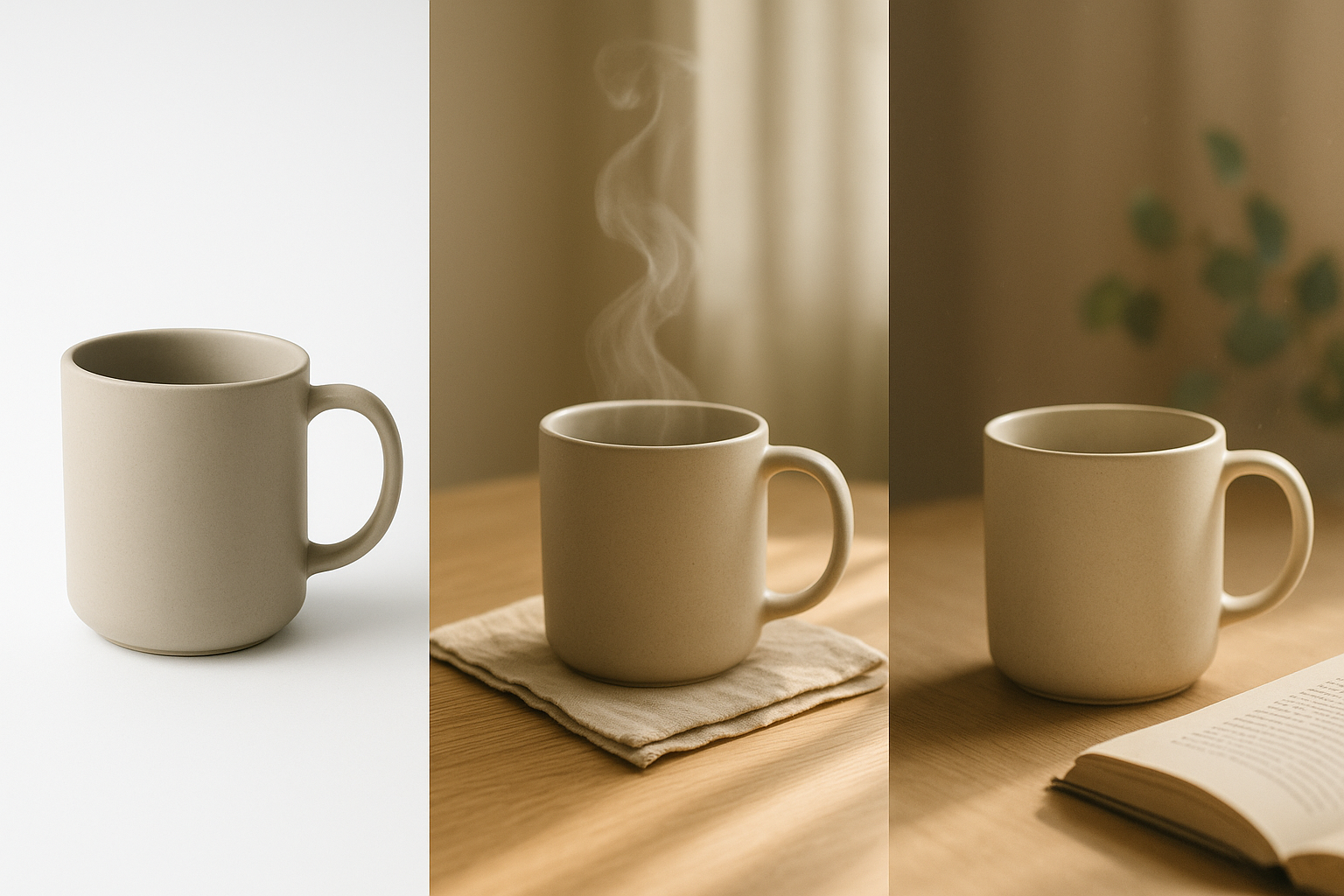
Most product pages lose sales because the images stop at plain white backgrounds. Shoppers want context. They want to feel how your product fits in their life. Lifestyle product photos deliver that story fast, lifting perceived value, trust, and add-to-cart intent.
In this guide, you will learn a proven workflow to transform basic catalog shots into high-converting lifestyle images for your Shopify store. No expensive studio, no complicated software. Just practical steps using AI tools.
Pro tip: You can follow along inside Supra AI Photo Studio, an AI-powered Shopify app purpose-built for this task. Install it here: Supra AI Photo Studio on the Shopify App Store or explore the full feature overview on the Supra AI Photo Studio site.
Why lifestyle images convert better
- They provide instant context. Shoppers quickly understand use, scale, and fit.
- They reduce friction. Fewer questions mean faster decisions and better conversion rates.
- They build brand consistency. Cohesive visuals signal professionalism and trust.
The step-by-step workflow
1) Start with a clean, isolated product
Before creating scenes, remove distractions and fix technical flaws.
- Use background remover to isolate the subject and get a clean cutout.
- Auto enhance to balance exposure, correct color cast, and recover detail.
- Upscale if your source image is small, so you can export crisp, high-res visuals.
Inside the app, open your product, then apply background removal and auto enhance from the left-side tools panel. Keep a copy of the isolated product for reuse across scenes.
2) Choose a lifestyle concept that matches buying intent
Map the photo to how and where your customer uses the product.
- Environment: kitchen counter, bathroom vanity, gym bag, office desk, boutique shelf, outdoors.
- Mood: bright morning, cozy evening, minimalist studio, luxury editorial, rugged adventure.
- Props: subtle and relevant only. The product remains the hero.
- Camera angle: top-down for flat lays, 45 degrees for depth, eye-level for realism.
3) Place the product into realistic scenes in minutes
Use Object Placement to drop your isolated product into natural environments. Guide the AI with surface type, lighting style, and camera angle. The tool preserves scale, reflections, and contact shadows so it looks photographed in place.

Tips for lifelike results
- Match light direction to your original product lighting.
- Keep contrast moderate; avoid overly flat or overly HDR looks.
- Add subtle imperfections like gentle wrinkles or a few crumbs on a counter for realism.
4) For fashion, generate on-model try-ons that look real
On-body visuals increase desire and reduce returns by clarifying fit and drape. With AI Try-On, you can select or create models, vary body types and skin tones, and preserve garment details like seams, prints, and textures.

Best practices for try-ons
- Show at least two body types to improve inclusivity and conversion.
- Use neutral, brand-aligned backdrops so the apparel remains center stage.
- Keep accessories minimal and authentic to the product’s target style.
5) Fine-tune color, light, and brand consistency
Your catalog should feel like a single, thoughtful collection.
- Use auto lighting correction to match contrast and white balance across images.
- Apply similar backgrounds and prop palettes product-wide.
- Standardize framing so product size on screen looks consistent.
6) Add motion to ads and PDPs with UGC and b-roll
Lifestyle stills get attention. Motion keeps it. Turn your best angles into short-form clips for product pages, ads, and social.
- UGC-style videos: Choose voice, vibe, and setting to turn a product image into influencer-style clips for TikTok and Reels.
- B-roll: Generate cinematic product drops, dust or liquid splashes, or slow-motion rotations that preserve your product’s details.

See it in action: Watch the quick demo trailer here: Supra AI Photo Studio Demo
7) Export, publish, and A/B test for lift
- Export multiple crops: PDP hero, gallery detail, thumbnail, and ad formats.
- Name files with descriptive keywords for SEO. Example: ceramic-mug-oak-table-lifestyle.jpg
- Add concise alt text focused on what is visible and useful. Example: Matte ceramic mug on sunlit oak table with linen napkin.
- A/B test hero images on high-traffic products to validate which lifestyle concept drives more add-to-carts and revenue.
Real-world scenarios you can ship today
- Coffee gear: From sterile pack shot to a warm morning scene with a pour-over, steam, and soft window light.
- Skincare: From jar-on-white to a bathroom vanity with dew, eucalyptus, and frosted glass ambiance.
- Tech accessories: From cable-on-table to a sleek desk setup with a laptop, lamp glow, and tidy cable routing.
- Apparel: From flat lay to on-model try-on in a modern loft, multiple sizes and skin tones.
The toolset that makes it fast
- Background remover, upscaler, and auto enhance for studio-quality baselines.
- Object placement to create lifestyle scenes that respect real light and shadow.
- AI try-on for apparel, jewelry, and accessories with pose, tone, and body variety.
- UGC video generator and b-roll for scroll-stopping motion.
- Mockup embedding for designs on apparel, packaging, posters, mugs, and more.
You can manage all of this directly inside your Shopify admin. Start free and scale as you grow: Install Supra AI Photo Studio. Plan details and quotas are outlined on the product site.
Quick checklist for high-converting lifestyle images
- The product is the hero with clear edges and readable details.
- Light direction and color temperature match across the scene.
- Realistic contact shadows and reflections anchor the product.
- Background and props support the story, not distract from it.
- Composition leaves room for overlays on ad creatives.
- Alt text and filenames include descriptive, human-friendly keywords.
Getting started now
Turning plain product photos into lifestyle images that convert does not require a studio, a big budget, or advanced editing skills. With AI-assisted workflows, you can produce on-brand, consistent visuals in minutes, test what resonates, and double down on the scenes that move revenue.
- Add the app to your store: Supra AI Photo Studio on the Shopify App Store
- Explore features and pricing: Supra AI Photo Studio site
Your products deserve more than plain photos. Give shoppers the context they need to click buy.

Comments
Post a Comment